
Payroll
Payroll overview
What Payroll does, how a pay run flows from calculation to payslips, and how it fits with HCM, Finance and the rest of Antly.
What Payroll Does
Payroll works out what each employee is paid for a period, takes it through approval, posts it to the ledger and gets payslips to people. It reads salaries, pay grades and placements from HCM, adds earnings and takes deductions according to your policies, and writes a balanced journal to Finance when a run is posted.
It works for a single company and for a government-style workspace with several organisations and schemes of service. Both are covered by the same screens:
- One payroll for the workspace (the default): every organisation shares the same policies, schedules and pay runs.
- A payroll per organisation: each pay schedule belongs to one organisation and pays only its people; policies can belong to one organisation or be shared.
Either way, the organisation picked in the header filters employees, pay lines and adjustments to that organisation.
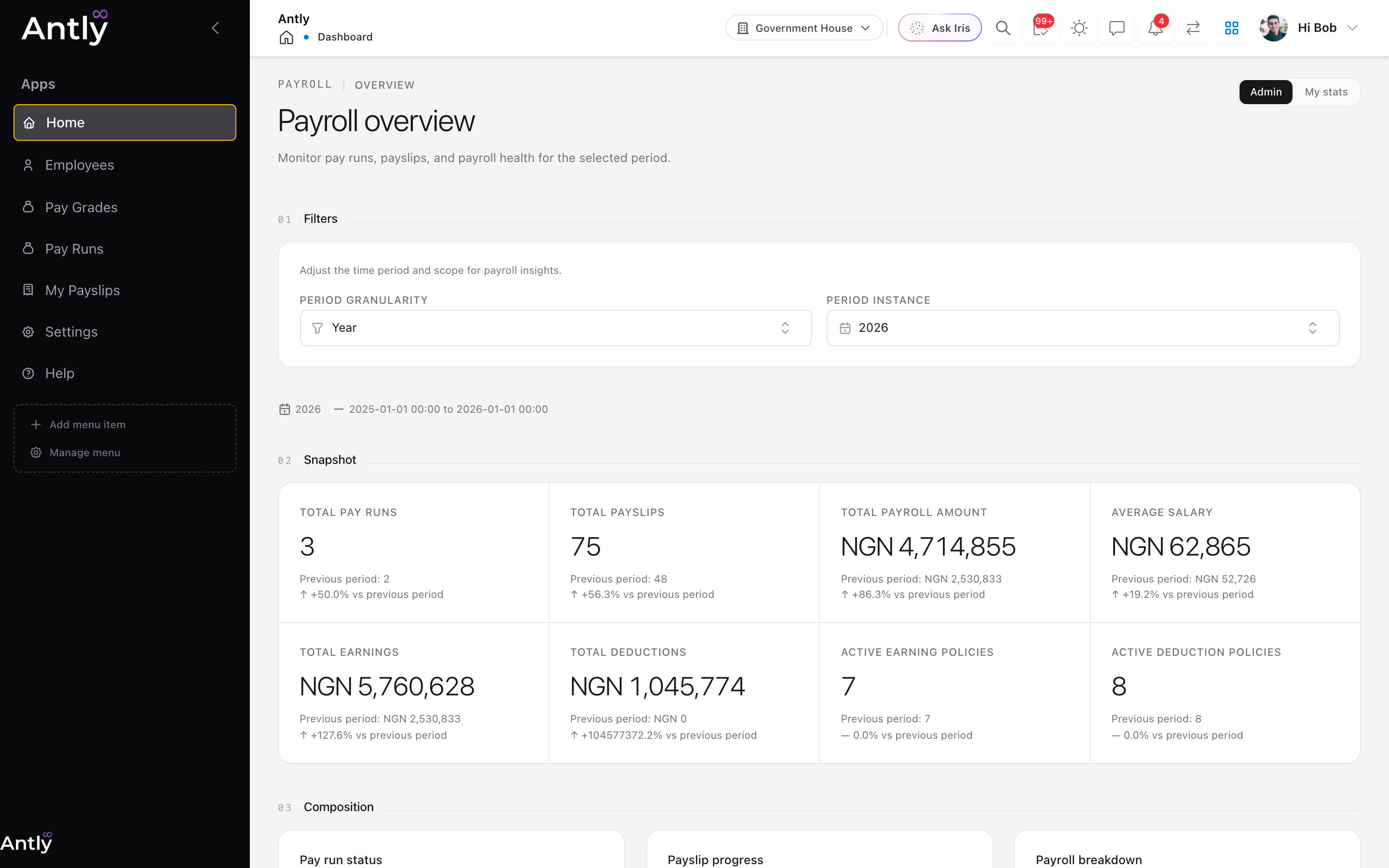 The Payroll overview: pay runs, payslips and payroll cost for the chosen period, compared with the period before.
The Pay Run Lifecycle
| Status | What happens | Who usually acts |
|---|---|---|
| Draft | The run exists for a schedule and period. Adjustments can be added. | Payroll officer |
| Calculated | Every employee the schedule covers has a pay line. Recalculate as often as needed. | Payroll officer |
| Approved | Figures are locked. Payslips can now be emailed. | The policy's named approver, or an administrator |
| Posted | The run is paid. A balanced journal is posted to the ledger when GL accounts are mapped. | Payroll or finance |
| Voided | A posted run reversed, together with its journal. | Finance |
A run can be returned to draft from Calculated or Approved. If a payroll policy does not require approval, a calculated run can be posted directly.
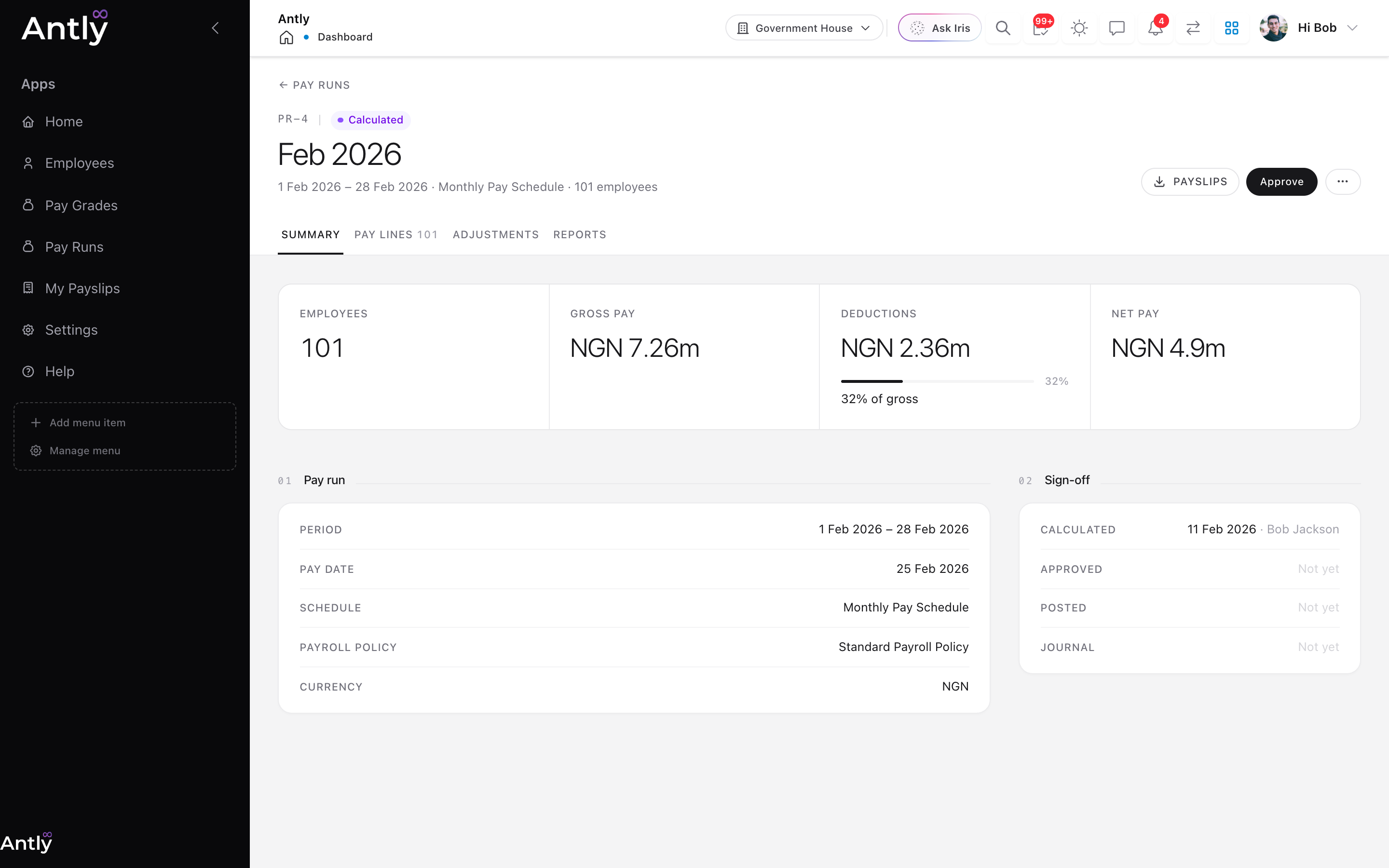 A calculated pay run. The header offers the one next step (Approve) and a payslip download; the sign-off trail records who did what.
What Gets Calculated
For each employee covered by the run's schedule, Payroll:
- Takes their salary for the period from HCM: an explicit salary record first, otherwise their pay grade and step.
- Prorates it by calendar day if they joined or left during the period. Leavers marked inactive still get their final pay.
- Adds earning policies that apply to them, then pre-tax adjustments.
- Takes pre-tax deductions, works out tax on what remains, then takes post-tax deductions and one-off deductions.
- Adds post-tax earnings and arrives at net pay.
Anyone the run cannot pay (for example, nobody has set their salary) is left out and listed by name after the calculation, so nothing fails silently.
Main Records
| Area | Records | Why it matters |
|---|---|---|
| Set-up | PayrollPolicy, PaySchedule | Currency, approval and GL accounts; who is paid together and when. |
| Earnings | EarningPolicy, EmployeeEarningPolicy, GroupEarningPolicy | Allowances, bonuses and other additions, for everyone, groups or named people. |
| Deductions | DeductionPolicy, EmployeeDeductionPolicy, GroupDeductionPolicy | Tax, pension, dues and other amounts taken from pay. |
| Pay runs | PayRun, PayRunLine | The run and one line per employee, including when their payslip was sent. |
| Line detail | PayRunEarning, PayRunDeduction | What made up each employee's pay. |
| Inputs | PayRunAdjustment, TimeEntry | One-off earnings or deductions for a run; hours for hourly staff. |
| From HCM | PayScheme, PayGrade, PayGradeStep, EmployeeSalary | Schemes of service, grades and steps, and direct salaries. |
How It Connects
- HCM: employees, placements, salaries, pay grades and pay schemes come from HCM. Pay follows the employee's home organisation; a secondment does not move pay.
- Finance: posting writes a journal through the ledger: payroll cost on the debit side; tax, other deductions and net pay on the credit side, each to its mapped account.
- Reports: payslips, the pay run summary, the payment mandate and bank file are reports, so you can restyle them or add your own.
- Email: payslips are emailed as PDFs from your workspace's mail settings.
- API and automation: everything above is available through JQL. See Payroll data & automation and /reference/payroll.
Who Uses It
- Payroll officers set up schedules, calculate runs and send payslips.
- Approvers check figures before they are locked.
- Finance posts runs and reconciles the journal.
- HR keeps salaries, grades and placements right in HCM.
- Every employee downloads their own payslips from My Payslips.
Related Pages
- Payroll setup: first-time configuration.
- Working in Payroll: running payroll each period.
- Payroll data & automation: namespaces, actions and workflows.